Viewing Progress Statistics
When the thinning process is in progress, you can view the statistics.
|
Viewing Progress Statistics |
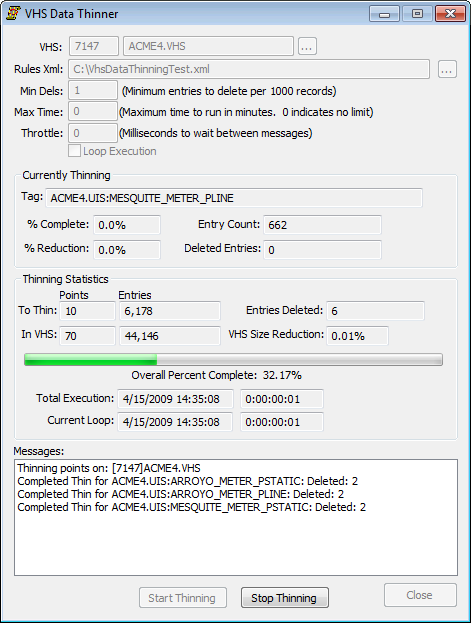
Currently Thinning
These are the statistics for the point currently being thinned.
| Property | Description |
|---|---|
|
Tag |
The LongID of current point being thinned. |
|
% Complete |
Percentage of how many entries have been thinned out of the total entries that need to be checked for the individual point. |
|
% Reduction |
Percentage of how much the point has been reduced by as a result of thinning. |
|
Entry Count |
Total number of entries the point has prior to thinning. |
|
Deleted Entries |
Number of entries that have been deleted for the point. |
Thinning Statistics
These statistics are for all the thinning which has occurred on the VHS in the current execution loop.
| Property | Description |
|---|---|
|
To Thin |
Number of points to check that meet the criteria of the currently applied thinning rule(s). Box on right, total number of entries that meet the criteria of the currently applied thinning rule(s). |
|
In VHS |
Total number of points in the historian. Box on right, total number of entries in the historian. |
|
Entries Deleted |
Total number of entries that have been deleted in the current execution loop. |
|
VHS Size Reduction |
Percentage of how much the size of the VHS has been reduced by. |
|
Percent Complete Status Bar |
Shows status of how many entries have been thinned out of all the entries that need to be checked. Percent complete displayed below the status bar. |
|
Total Execution |
Date/Timestamp of when the data thinner was started. Box to the right, shows the duration of the total runtime in D:hh:mm:ss. |
|
Current Loop |
Date/Timestamp of the current execution loop. Box to the right, shows the duration of the current loop in D:hh:mm:ss. |
Messages
The Messages window displays a status record of which points have been thinned since the thinner was started. The record also lists any errors that may have occurred during the thinning process. After a point has been thinned the Messages window will be updated with a message such as "Completed Thin for Point Name" and number of records deleted for that point.


